Capturing JobStreet Talent Search unlocks
Turn JobStreet profile unlock emails into candidates with their CV, and put them on the job for your JobStreet ad.
When you unlock someone's profile in JobStreet Talent Search, JobStreet emails you their details and CV. Kepler reads that email from your connected mailbox and adds the person as a candidate with their CV, email and phone. When the email names one of your JobStreet ads, Kepler also puts them on that ad's job.
Before you start
- Connect the mailbox that receives JobStreet's emails under Settings → Connected accounts. Kepler reads new mail only, not mail that was already there when you connected.
- Job-board applications from email under Settings → Automations, and Save attachments to records under Settings → Record capture, must be on. Both are on unless someone turned them off.
- CVs from people who write first, also under Settings → Record capture, decides what happens to someone who isn't in Kepler yet: Add as candidate creates them, Ask holds the CV until you choose New candidate or Skip, and Leave creates nobody.
How an unlock is captured
- Kepler recognises JobStreet's "Name's profile information" email and reads the name, email, phone and attached CV. If only JobStreet's own profile PDF is attached, that becomes the CV.
- Someone already in Kepler, matched by email or phone, gets the CV on their record. Someone new is added as a candidate from JobStreet Talent Search, and you get a New candidate from JobStreet Talent Search notification.
- If the email names your JobStreet ad, Kepler puts the person on that ad's job: the job the ad is linked to, or else the one open job with exactly the same title. They go into the pipeline at your Inbound default stage (the first stage if none is marked), marked Sourced · JobStreet.
- Notifications → Activity shows a row such as 2 JobStreet unlocks added to "Key Account Manager". When Kepler chose the job itself, the row has Undo.
An unlock isn't an application: it skips the job's Applicants tab and isn't scored. Most unlock emails don't name an ad; those only add or update the candidate.
If the ad isn't linked to a job yet
When no open job has the ad's title, or several do, Kepler doesn't guess. To review shows 2 people unlocked for "Key Account Manager" with Link job, and the same ask appears on Jobs → Applicants.
- Select Link job. Which job are these unlocks for? lists the closest open jobs with their client.
- Pick one, search for another under Or another job, or select Create job from this ad. Waiting shows who will be added.
- Select Link job. The people waiting are added to the job, and later unlocks for that ad go there too. The toast offers Undo for 10 seconds.
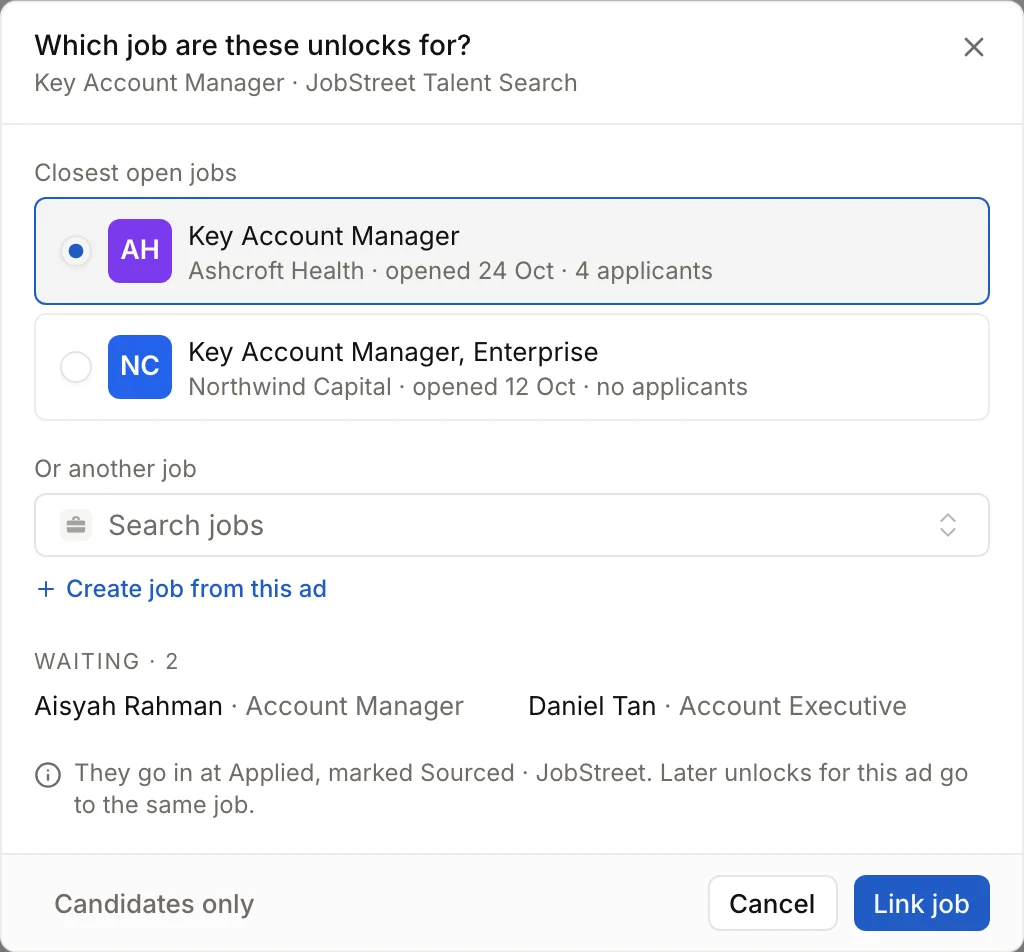
Choose Candidates only to keep people unlocked for that ad as candidates without a job. Later hides the ask until another unlock arrives for the ad.
A JobStreet ad and a SEEK ad with the same title share one link, so linking either puts both on the same job. Link an ad on a job's Advertising tab doesn't list JobStreet; link the SEEK ad with the same title instead, or answer the ask in To review.